According to Google, 76% of people who search for something nearby on their smartphone visit a business within a day. This is where a store locator becomes a powerful tool.
A store locator is a web-based feature or widget that helps customers quickly find the nearest physical store location. It is widely used by retailers, restaurants, salons, gyms, and franchise chains.
Moreover, modern store locators also provide simple maps, directions, filters, and even personalized recommendations. Let’s understand more about store locators, why you must have one for your multi location business in this blog.
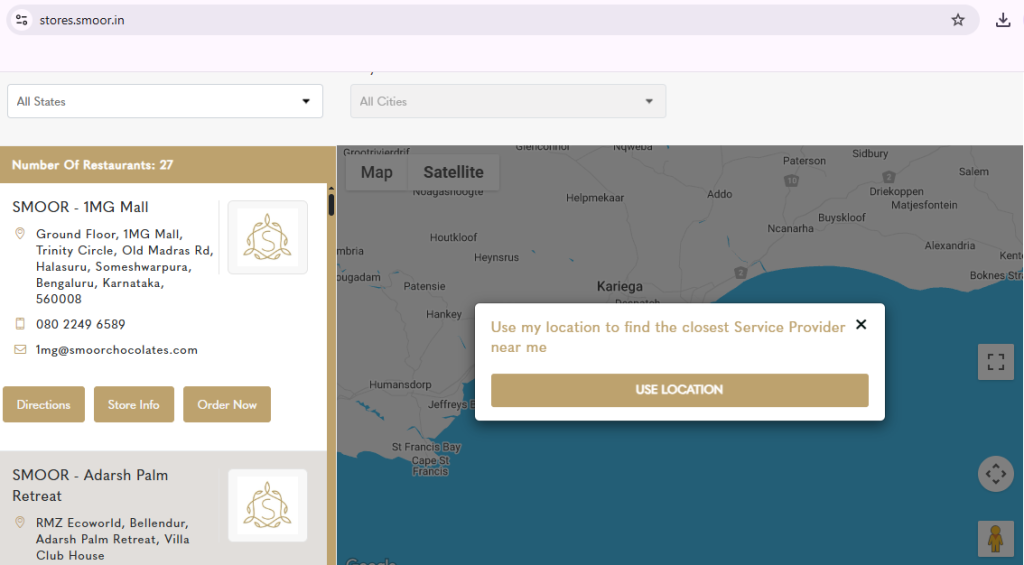
Smoor Store Locator made by Famepilot
How Does a Store Locator Work?
A store locator connects a business’s location data with customer queries. It works in three simple steps:
1. Data Collection
The business uploads store details such as name, address, phone number, timings, and services. This data is stored in a central content management system or WordPress site’s database or a system built on a platform like Magento. Also, some store locator tools use Google Maps, storing location data on Google’s servers or in the business’s Google Cloud account.
2. User Query Processing
A customer enters their location or allows GPS access. The system matches the customer’s location with the nearest branch or outlet and displays recommendations for the nearest store locations.
3. Map and Result Display
The locator displays results using Google Maps, Apple Maps, or other APIs. Advanced store locators also show ratings, offers, and filters for better experience.
Why Do Businesses Need a Store Locator?
Businesses need a store locator to help customers quickly find nearby locations, improve convenience which leads to more foot traffic and sales and increased customer satisfaction.
- Improved Customer Experience: Customers save time and effort finding your stores.
- Increased Foot Traffic: Local searches directly bring more walk-ins.
- Better Brand Trust: Accurate store data builds credibility.
- Centralized Management: One dashboard helps manage hundreds of locations.
In fact, a survey by Think with Google reveals that “near me” searches have grown more than 500% in the last few years. Without a store locator, businesses risk losing these valuable customers to competitors.
Also Read: What Information Should a Good Store Locator Include?
Key Features of an Effective Store Locator
Here are the essential features that make a store locator effective and user-friendly:

- Integration with Maps: Easy navigation via Google or Apple Maps.
- Mobile-Friendly Design: Optimized for fast search on smartphones.
- Auto-Detection of Location: Shows nearest store without manual input.
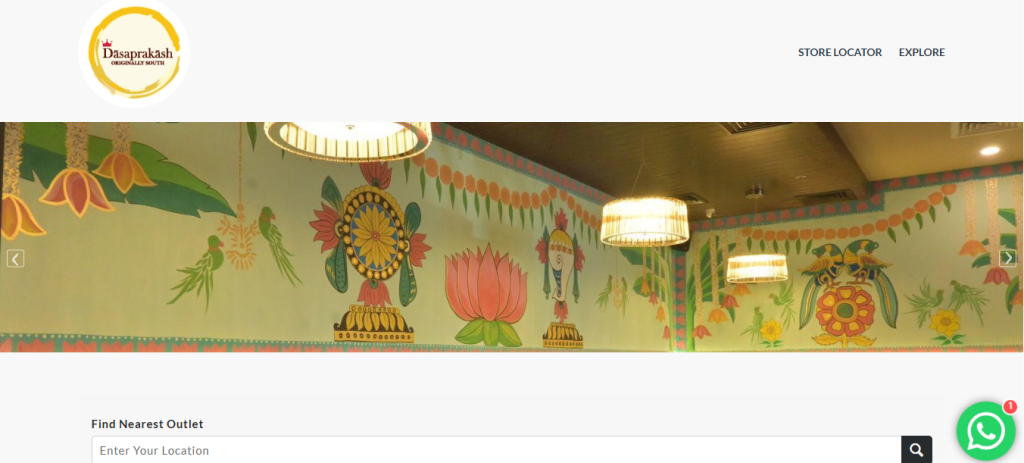
- Custom Branding: Match the design and theme of your website.
- Analytics: Track searches, clicks, and user behavior for insights.
- Filters and Categories: Customers can filter by services, timings, or facilities.
- Multi-Location Support: Handle hundreds of branches in one system.
Store Locator is Beneficial for Businesses
Imagine a restaurant chain with 50 outlets across the US. A hungry customer searches for “pizza near me” and lands on the brand’s website. With a store locator:
- They see the nearest branch instantly.
- They can filter by dine-in, takeaway, or delivery.
- They get real-time directions in one click.
This not only improves customer satisfaction but also boosts sales by converting online visitors into in-store customers.
Get a Customized Store Locator Created by Famepilot
Every business is unique, and so are its locations. Famepilot helps you create a fully customized store locator that matches your brand’s look and feel while offering a smooth experience to your customers. From advanced filters to interactive maps, our solution ensures that your customers can easily find the nearest outlet and visit with confidence.
With Famepilot’s custom store locator, you get:
- Seamless design that matches your website’s style
- GPS-based “find-me” search and smart filters (city, services, opening hours)
- Real-time sync with your Google Business Profile to keep data fresh
- Embedded maps and click-to-call or directions buttons
- Analytics to track how customers interact and which locations perform best
Let us build a map tool that not only looks great, but drives more people into your stores. Ready to turn lookers into visitors? Get your store locator built and managed by Famepilot.
Frequently Asked Questions About Store Locators
1. What is the function of a store locator?
A store locator helps customers quickly find the nearest physical store or service location based on their current location or a chosen area. It is an online tool or feature on a website/app that shows users where a brand’s stores or outlets are located.
2. How do store locators handle multiple store locations in one city?
Store locators handle multiple store locations in one city by using intelligent filtering and mapping features to avoid confusion and improve user navigation. When several stores are close together, the locator:
- Clusters nearby locations on the map to prevent overlapping pins, expanding them as users zoom in.
- Sorts results by proximity to the user’s current location or entered address.
- Displays key differentiators like store type, operating hours, services offered, or availability.
- Allows filtering and comparison, so users can choose the most convenient branch based on their preferences.
This approach ensures customers can easily identify and visit the most suitable store, even in cities with multiple branches.
3. How can I get a mobile-friendly store locator?
To ensure a seamless user experience, choose a responsive store locator that automatically adjusts to all screen sizes whether it’s a smartphone, tablet, or desktop. Mobile-friendly locators offer touch-optimized navigation, larger clickable areas, and smooth map scrolling, allowing customers to easily find your nearest branch on the go.
Platforms like Famepilot provide fully responsive store locators that maintain performance and design consistency across all devices.
4. Can a store locator integrate with Google Maps or Apple Maps?
Yes, most modern store locators are designed to integrate seamlessly with Google Maps or Apple Maps. This integration enables users to get real-time navigation, directions, and distance estimates directly from your website. It also builds trust, as customers rely on familiar mapping tools for accurate routes. Thus, integration enhances convenience and encourages foot traffic to your physical stores.
5. Can I track customer searches within the store locator?
Absolutely. A well-built store locator includes analytics and reporting features that allow you to track user behavior such as the most searched locations, popular keywords, and clicks on directions or contact buttons. This data helps businesses understand customer intent, optimize marketing strategies, and make data-driven decisions to improve visibility and conversions.
6. How do I update or manage multiple locations easily in a store locator?
Managing multiple store branches becomes effortless with a cloud-based (SaaS) store locator. These platforms allow bulk uploading, editing, and real-time synchronization of data across all locations. You can instantly update store hours, addresses, or phone numbers without needing technical expertise. This ensures consistency and accuracy across your website, Google Business Profiles, and other digital platforms.
8. Can I add promotions or offers to my store locator?
Yes, you can. Many advanced store locators allow businesses to highlight ongoing promotions, discounts, or seasonal offers for individual store locations. This feature not only enhances user engagement but also drives in-store visits by showcasing time-sensitive deals. For instance, you can display a “20% off today” badge or “New product available” near the store listing.
9. Is it possible to highlight franchise or partner stores differently?
Definitely, you can use custom tags, color-coded pins, or filters to visually distinguish between franchise-owned, company-operated, or partner locations. This helps users quickly identify the type of outlet they’re visiting and ensures transparency in your business structure. It’s especially useful for brands with mixed ownership models or diverse regional partners.
10. Can customers filter results by services, timings, or facilities in a store locator?
Yes, and this is one of the key features that enhances user experience. A well-designed store locator offers custom filters for services (e.g., home delivery, in-store pickup), store hours, payment options, parking availability, and more. This allows customers to find exactly what they need faster and more conveniently, reducing friction and improving satisfaction.
11. What happens if my store relocates or closes, how fast can it be updated?
Updates can be made instantly through the backend, reflecting live on the website. For example, here at Famepilot we create the store Locator and our team manages it. Our users (clients) need not make any changes. Our expert team does the required changes whether any update or addition of a new outlet location.
12. Can a store locator show reviews or ratings for each location?
Yes, many advanced store locators can integrate with review and reputation management platforms like Famepilot, Google Reviews or Yelp to display average star ratings, customer feedback, and testimonials for each location. This helps potential customers make informed decisions by seeing real experiences from others.
With Famepilot, you can go one step further, our platform allows customized store locators that display reviews, average ratings, and even customer sentiments directly on your locator map. This builds trust, improves engagement, and boosts conversions by helping your business stand out locally.
13. Do store locators work offline or only with internet access?
Store locators generally require an active internet connection to function fully, as they depend on live map services like Google Maps or Apple Maps for displaying routes, distances, and updated store details.
However, some store locators offer offline functionality through cached data, which temporarily stores previously viewed maps or store lists. This means users may still access basic information like store names and addresses without internet access, though features like real-time directions or filtering won’t work until reconnection.
14. How secure is the customer data collected through a store locator search?
Data security should be a top priority when using or managing a store locator. If the locator collects user information (such as location data, search behavior, or contact details), it’s crucial that it complies with global data protection laws like GDPR, PDPL, or CCPA.
At Famepilot, we ensure that all store locator data is encrypted, anonymized, and compliant with relevant privacy regulations. We prioritize user trust by following best-in-class data handling practices, ensuring that sensitive customer information remains protected against unauthorized access or misuse.
15. Can a store locator show directions to the nearest store?
Yes, nearly all modern store locators are built to provide real-time navigation and directions to the nearest or preferred store. These locators typically integrate with Google Maps or Apple Maps APIs, allowing users to view routes, estimated travel time, and turn-by-turn navigation directly from your website or mobile app.
This not only improves customer convenience but also drives in-store visits, helping businesses bridge the gap between online discovery and offline purchase.
16. Can a store locator show results based on a customer’s location automatically?
Yes, advanced store locators come with automatic location detection features using GPS or IP-based geolocation technology. This allows the system to instantly identify a customer’s current location and show the nearest stores without requiring manual input like ZIP codes or city names.
This feature delivers a smoother, faster, and more personalized browsing experience, ideal for users searching on mobile devices. With Famepilot, businesses can offer this functionality seamlessly, ensuring that every customer quickly finds the most convenient branch or outlet nearby.