Travelers and diners begin their journey online, usually with a Google search. Whether someone is searching for “best hotels near me” or “top-rated restaurants in Jaipur” for example, your Google Business Profile (GBP) plays a huge role in whether they choose you or your competitor.
For the hospitality sector, maintaining accurate and optimized Google listings is essential for visibility, credibility, and customer trust.
Let’s learn more about Google Listings for Hotels and Restaurants in this blog.
Why Does Google Business Profile Matters for Hotels and Restaurants?
When guests search online, they judge your brand based on your ratings, reviews, photos, and recent updates. A well-maintained Google Business Profile ensures you appear in:
- Google Maps searches (for nearby travelers or diners)
- Local Pack results (the top three listings shown before organic results)
- Voice searches (like “Hey Google, find a nearby hotel with free breakfast”)
If your business listing is outdated, has missing details, or inconsistent information, you risk losing potential bookings and walk-ins.
Common Business Google Listing Challenges in the Hospitality Industry
Hotels and restaurants often face several issues:
- Duplicate or unverified listings that confuse customers
- Inconsistent name, address, and phone (NAP) across platforms
- Outdated photos or menus that don’t reflect the current experience
- Delayed review responses that affect credibility
- Poor local visibility due to unoptimized business categories or keywords
Fortunately, these are all fixable, with the right strategy and tools.
Best Practices to Maintain Google Listings for Hotels and Restaurants
Let’s look at practical steps to maintain and optimize the Google Listing of your hotel or restaurants:
1. Claim and Verify Every Property
If you run multiple hotel branches or restaurant outlets, each should have a verified Google Business Profile. Verification ensures ownership and lets you manage reviews, insights, and updates directly.
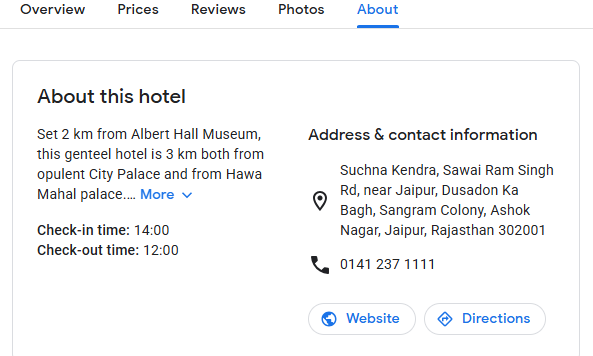
2. Keep NAP Details Consistent
Maintain the same name, address, and phone number across all online platforms- Google, TripAdvisor, Zomato, Facebook, and your website. Even small inconsistencies can hurt local SEO rankings.
3. Choose the Right Business Categories
Select relevant primary and secondary categories. For example:
- “Hotel,” “Resort,” or “Boutique Hotel” for accommodation businesses
- “Fine Dining Restaurant,” “Cafe,” or “Quick Service Restaurant” for eateries
This helps Google match your listing with the right search intent.
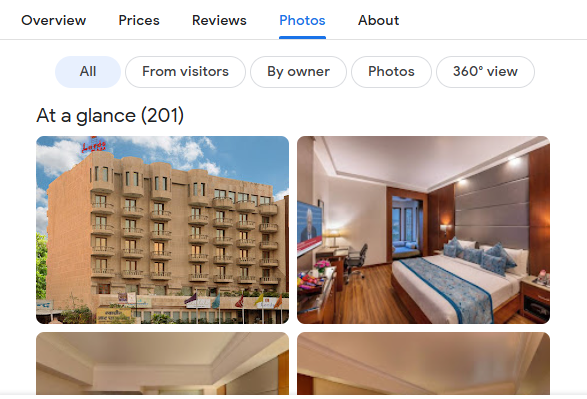
4. Update Photos and Menus Regularly
Visuals drive clicks. Upload high-quality photos of your property, rooms, food, or dining space. Update your menu whenever prices or offerings change.
5. Use Posts and Offers to Stay Active
Google rewards active profiles. Use Google Posts to share events, promotions, or special menus. This keeps your audience engaged and signals to Google that your listing is well-maintained.
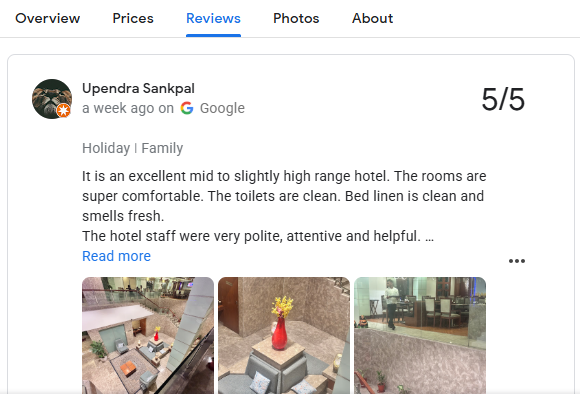
6. Encourage and Respond to Reviews
Guest reviews influence not only potential customers but also your Google ranking. Encourage happy guests to leave positive feedback, and always respond professionally to both positive and negative reviews.
7. Monitor Insights and Performance
Use the “Insights” tab in Google Business Profile to track customer actions including calls, website visits, and direction requests. Analyze this data to refine your local marketing strategy.
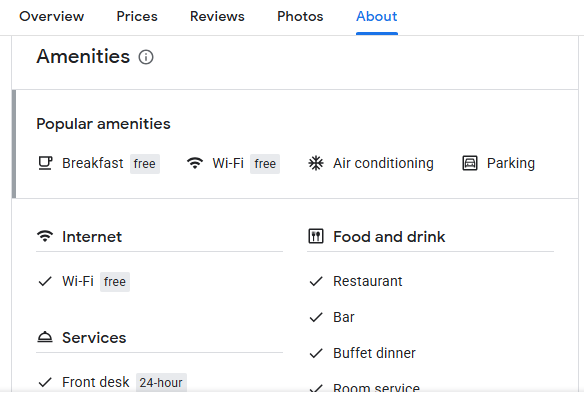
8. Highlight Amenities and Safety Measures
Hotels and restaurants should make full use of the “Attributes” section on Google Listings to showcase amenities and health measures that matter most to guests. Mention services such as free Wi-Fi, complimentary breakfast, air conditioning, valet parking, and airport shuttle service.
Highlight health and safety features such as enhanced cleaning, personal protection, physical distancing, and increased food safety. Keeping this information updated not only boosts customer trust but also helps your business appear in relevant searches where travelers prioritize comfort and safety.
How Famepilot Helps Hotels and Restaurants Maintain Listing Hygiene?
Managing multiple listings manually can be time-consuming. That’s where Famepilot, a trusted SaaS platform for local SEO and reputation management, makes a difference.
At Famepilot, we specialize in helping hospitality brands optimize and manage their Google Business Profiles effectively.
Here’s How Famepilot Supports You:
- Google Business Profile Optimization: We ensure every detail, including NAP, categories, and keywords, is accurate and updated.
- Listing Hygiene Maintenance: Detects and fix duplicate, missing, or inaccurate listings across platforms.
- Bulk Update System: Update details for multiple branches in one go, ideal for restaurant and hotel chains.
- Local SEO Tools: Famepilot’s built-in tools help track local keyword positions and Google Maps visibility.
- Review Management: Monitor, respond, and analyze customer feedback from Google, TripAdvisor, and more in one dashboard.
- Google Account Verification: We assist with verification for new outlets or franchises.
Famepilot saves you hours of manual work, ensuring your listings remain accurate, optimized, and visible, so your guests find you first, not your competitor.
FAQs about Google Listing Management for Hotels and Restaurants
1. How often should hotels update their Google listings?
Hotels should review and update their Google listings at least once every month or whenever there’s a change in pricing, photos, contact details, or seasonal offers. Regular updates help maintain accuracy, boost visibility in Google Maps, and build guest trust. Keeping your listing fresh also signals to Google that your business is active and reliable.
2. What are the best tools to manage multiple listings efficiently?
Managing multiple hotel branches or restaurant outlets manually can be time-consuming. Tools like Famepilot, Google Business Profile Manager, and Yext allow you to manage listings in bulk- update information, monitor reviews, and analyze performance insights, all from one dashboard.
Famepilot, in particular, is designed for hospitality brands that want to streamline listing management and review response efficiently.
3. How do reviews impact Google rankings for restaurants?
Reviews are one of the strongest local SEO signals. Restaurants with more positive and consistent reviews tend to appear higher in Google’s Local Pack and Maps.
Responding to reviews; both positive and negative- shows engagement, which also improves your ranking and credibility. In short, better reviews mean better visibility and more walk-ins.
4. How do I list my hotel on Google?
To list your hotel, go to Google Business Profile and click “Add your business to Google.” Enter your business name, address, category (e.g., “Hotel” or “Resort”), and contact details.
Once added, verify your listing via postcard, phone, or email. After verification, you can manage photos, reviews, and updates directly from your Google dashboard.
5. How to use Google to search for hotels?
Simply type “hotels near me” or a location-specific query like “best hotels in Jaipur” into Google Search or Google Maps.
You can filter results by rating, price, amenities, or distance. Google pulls this data from verified Business Profiles, so maintaining your listing helps ensure your hotel appears in these filtered results.
6. How much does it cost to get listed on Google Maps?
Listing your hotel or restaurant on Google Maps is completely free. Google does not charge for creating or managing your business listing.
However, you may choose to run paid Google Ads to increase visibility in Maps or search results, but basic listing and management features remain free of cost.
7. Does Google charge for a listing?
No, Google Business Profile is free for all businesses, including hotels and restaurants. You don’t have to pay to create, claim, or manage your listing.
The only optional cost comes if you choose to advertise your business through Google Ads for enhanced visibility. Keeping your listing active and optimized doesn’t require any payment.
Final Thoughts
In 2025, maintaining Google listings isn’t just about being online, it’s about being found by the right audience. For hotels and restaurants, an optimized, active, and well-managed profile can directly lead to more bookings, more walk-ins, and stronger brand reputation.
If you want to manage all your listings and reviews from one simple dashboard- Famepilot is the all-in-one solution you need.
Our email id – [email protected]
Book a Demo with Us – https://famepilot.com/product-demo/
Our Contact Us (form) – https://famepilot.com/contact-famepilot/