Imagine a customer eager to visit your nearest store but unable to find your location details quickly. That’s a lost opportunity right there.
A store locator is more than a map on your website—it’s a powerful tool that connects online traffic to offline sales. Whether you’re a retail chain, restaurant franchise, healthcare clinic, or a service center, having a store locator boosts customer experience, improves local SEO, and helps you gain better insights into your audience’s behavior.
So, how can you make it easy for customers to find you, every time and create a store locator on your website the right way?
Let’s break it down, step by step.
Step 1: Plan Your Store Locator
Before you start building, define what you want your store locator to do.
Ask yourself:
- How many locations do you have?
- Do you want filters like city, ZIP code, services, or store timings?
- Do you want customers to find the nearest store using GPS?
- Do you need analytics?
Pro Tip: Compile a checklist of all your store locations in an excel or Google Sheets. Include:
- Store name
- Full address
- Latitude & longitude (for maps)
- Phone number
- Working hours
- Services available
Step 2: Choose the Right Store Locator Tool or Platform
You can create a store locator manually or use platforms like:
- Store locator software: Tools like Famepilot can help you create store locators quickly with added features like search filters, analytics, and mobile responsiveness.
- Google Maps API: Great for customized maps but requires developer skills.
Why Use a Tool Like Famepilot?
- Easy setup and Support for Customization
- Auto-sync with your Google Business Profile
- Real-time updates across locations
- Works on both desktop and mobile
Step 3: Design a User-Friendly Interface
Your store locator should be clean, simple, and mobile-friendly.
Best practices:
Keywords to Keep in Mind:
- store locator for website
- find a store near me
- store finder tool
- store location map
Step 4: Embed the Store Locator on Your Website
Once designed, embed the store locator on a dedicated “Find a Store” page or your homepage.
How to embed:
- Custom Code: Use HTML/CSS/JavaScript with Google Maps API.
- Third-party Plugin: Famepilot and other platforms provide an embeddable code snippet.
- CMS Plugins: If you’re on WordPress, Shopify, or Wix, use store locator plugins.
Step 5: Optimize for SEO and Mobile
An effective store locator raises your ranking in local searches such as “clothing store near me” or “restaurant in Andheri East.”
SEO Checklist:
- Use structured data (schema markup) for each location
- Add unique content for each store page
- Include keywords like “store locator,” “find a store,” or “[business type] near me”
- Optimize for mobile responsiveness
- Add internal links to store pages
Step 6: Keep It Updated in Real-Time
Store hours change. Addresses get updated. Ensure that your locator reflects real-time data to avoid misleading customers.
With Famepilot, your Google Business Profile and store locator are always in sync—saving time and reducing errors.
Step 7: Track Customer Behavior and Improve
Once your store locator is live, monitor how people interact with it.
Track:
- Number of searches
- Most searched locations
- Clicks on directions or calls
- Drop-off points
Tools to Use:
- Famepilot analytics
- Google Analytics
- Hotjar or other heatmaps
This helps you refine location pages and marketing campaigns.

How a Local Brand Increased Foot Traffic?
A multi-location salon chain using Famepilot’s Store Locator saw a 40% increase in store visits within 3 months. Customers were able to find the nearest branch quickly, explore services, and book appointments online. Plus, they started ranking for “salon near me” in multiple cities.
Final Thoughts: Turn Searches into Visits
One of the best strategies to convert online engagement into offline action is to include a store locator on your website. It enhances user experience, builds local visibility, and directly boosts in-store traffic and sales.
Whether you have 5 locations or 500, the right store locator solution—like Famepilot—can help you manage, optimize, and grow with ease. Below is a list of store locators developed and powered by Famepilot for our various clients.
- stores.goodflippin.com
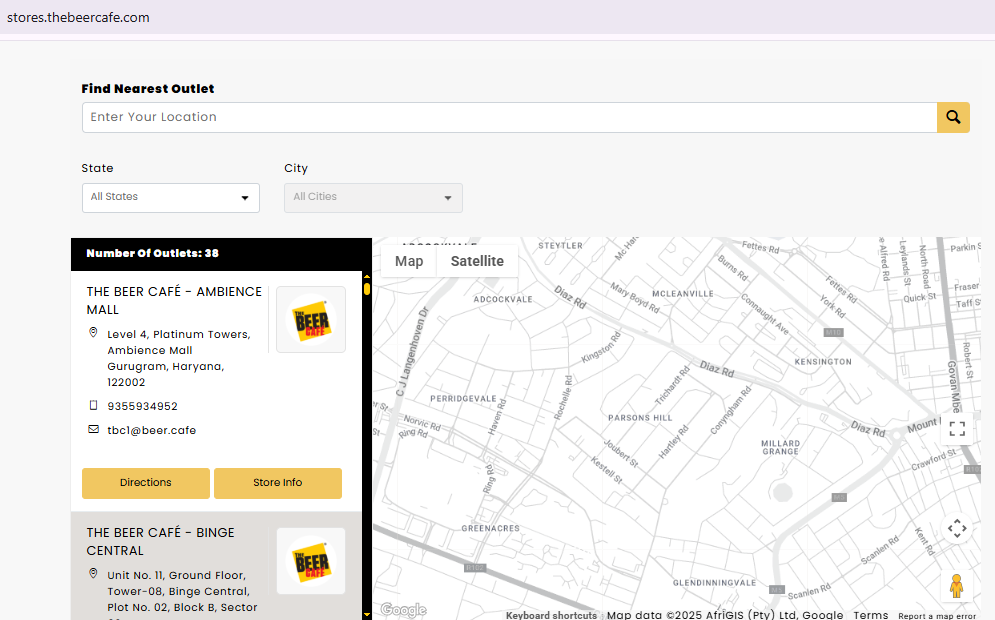
- stores.thebeercafe.com
- stores.smoor.in
- stores.gourmetinvestments.com
- chilis.gourmetinvestments.com
- stores.lbf.co.in
- stores.thedasaprakash.com
- stores.thirdwavecoffeeroasters.com
- stores.powerlook.com
Need Help Creating a Powerful Store Locator?
Famepilot offers a ready-to-use, customizable store locator that’s synced with your business listings and made for growth. Get started today and turn every search into a store visit. Contact Us Now!
Our email id – [email protected]
Book a Demo with Us – https://famepilot.com/product-demo/
Our Contact Us (form) – https://famepilot.com/contact-famepilot/
Frequently Asked Questions (FAQs)
1. What is a store locator and why is it important?
A store locator is a tool on your website that helps users find your physical business locations based on their city, ZIP code, or current location. It’s important because it improves customer experience, drives in-store visits, and enhances your local SEO.
2. How many locations can I add to a store locator?
Most store locator platforms allow unlimited locations, depending on your plan. Whether you have 5 or 500 outlets, a good store locator can manage them efficiently.
3. Is a store locator helpful for SEO?
Absolutely. Store locators with individual location pages and proper schema markup can boost your local search visibility, helping you rank higher in searches like “[your business] near me.”
4. Can I link my Google Business Profile with a store locator?
Yes, Famepilot lets you sync your store locator with Google Business Profiles, ensuring accurate real-time information across all platforms.
5. What features should I look for in a store locator tool?
Look for features like:
- Mobile responsiveness
- Search filters (city, ZIP, services)
- Distance-based sorting
- Embedded map integration
- Call and direction buttons
- Analytics and tracking
- Easy customization
6. How can I monitor my store locator’s performance?
You can use Google Analytics, Hotjar, or the in-built analytics dashboard (like Famepilot’s) to track user activity, location searches, and conversion actions like direction clicks or calls.
7. Do I need separate location pages for each store?
It’s a good practice to have separate SEO-optimized pages for each location. This helps your business rank better in local searches and improves customer experience.